Image Manipulation Quick And Easy Way

Nowadays you don’t have to be a graphic designer to have a need in manipulating images. Whether you have a website, or a blog to upload images to you, at least, need a quick way to resize the images to fit your site’s layout. But not everyone can afford or know how to work with Photoshop, or even download and install one of the popular free graphic applications like Gimp. What if I told you that you can not only resize but touch up your images online within a comfort of your browser?
Picnik
My colleague, Jennifer, told us today about this cool Firefox extension that lets you edit any image in a free online image editor called Picnik. I immediately got it installed, and set to try it out.
Turns out that you can integrate Picnic not only with Firefox but also with Internet Explorer. You can go to Picnik Tools and download the needed extension for your browser.
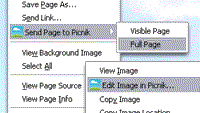
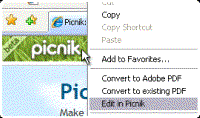
Afterwards you can simply right-click on an image in the browser and edit it in Picnik, then save it and upload to your site. The cool thing is that it also works as a standalone online application, that can be easily integrated with your Flickr, Facebook, Picasa and Photobucket accounts.
It takes a bit of time to load that image the first time, but then everything runs very smoothly. You can manipulate not only the online images but the local ones from your computer as well.

Here’s what you can do with Picnik:
- Under PHOTOS section you can get images from your computer, from a website by providing a URL to the image, by performing a Yahoo or Flickr search, you can even edit photos taken by your WebCam, access your Facebook and Picasa photos.
- Under EDIT section you can Rotate, Crop, Resize your images, or tune their Exposure, Colors, Sharpen or fix the Red-Eye.
- Under CREATE section you can add some Basic Image Effects like converting them to Black&White, Sepia, creating a Vignette. You can even add a text to your images with some Basic fonts, add shapes, do some touch-ups, and enclose them into some basic frames.
- You can also get access to more advanced features (more effects, more fonts and frames to choose from) for $24.95 per year.
- Under Save & Share section you can either save the final results to your computer (supported formats are JPG, PNG, GIF, BMP, PDF, Tiff), or send it by email, even email to your website (if applicable), or store to your Flickr account.

So here you go. Now you have no excuse of not sprucing your blogs with some photos or screenshots in a size that won’t break the layout of your site.
While playing with Picnik I’ve discovered some other similar online image editing applications and I’m planning on doing a review on all of them in a near future. Let me know what you think of Picnik and whether you know of any other handy online image manipulators.
WordPress 2.1 - new and useful features
Behind The Scenes Of Exquisite Web Typography - Part Three
8 Finest Bits Of Free Stock Photo Sites






November 16th, 2007 at 10:45 pm
Lovely! Thanks for the heads-up Vivien:)
November 17th, 2007 at 5:44 pm
This looks absolutely groovy Vivien. I was looking for a crop function the other day on my Mac too and this would’ve come in handy.
November 17th, 2007 at 11:35 pm
You’re welcome, Ajay.
Glad you found it useful, Ronald. Have fun with it
November 18th, 2007 at 2:34 pm
Nice find . I had heard of it before but never knew it could be used with IE as well.
November 21st, 2007 at 3:28 am
This is great Vivien I have just downloaded it for my mac. I think I will put it on my PC too as I don’t have an image editor on there. I might have to share on my blog (will give you a mention of course) if you don’t mind?
November 21st, 2007 at 10:34 am
It’s always nice to have applications or sites that work in both FF and IE, isn’t it, Madhur?
Tara, glad you found it useful. Of course, you can share it with your blog’s readers. The more people find out about tools like this the better.
December 5th, 2007 at 11:45 am
This has already made my life easier and my posts better. Good call!
Jon S.
January 15th, 2008 at 9:36 am
Thanks, that’s such a great ff extension
January 15th, 2008 at 9:41 am
You’re very welcome